HR reports and dashboards
Executive HR cockpits, headcount distribution, employee turnover rates, gender diversity, overtime trends, and payroll cost analytics.
1. Overview & Business Value#
This comprehensive operational guide details the architecture, business workflows, configuration parameters, and execution steps for HR reports and dashboards within SmartERP.
This page is for HR Directors, Executives, and Operations Managers analyzing workforce metrics.
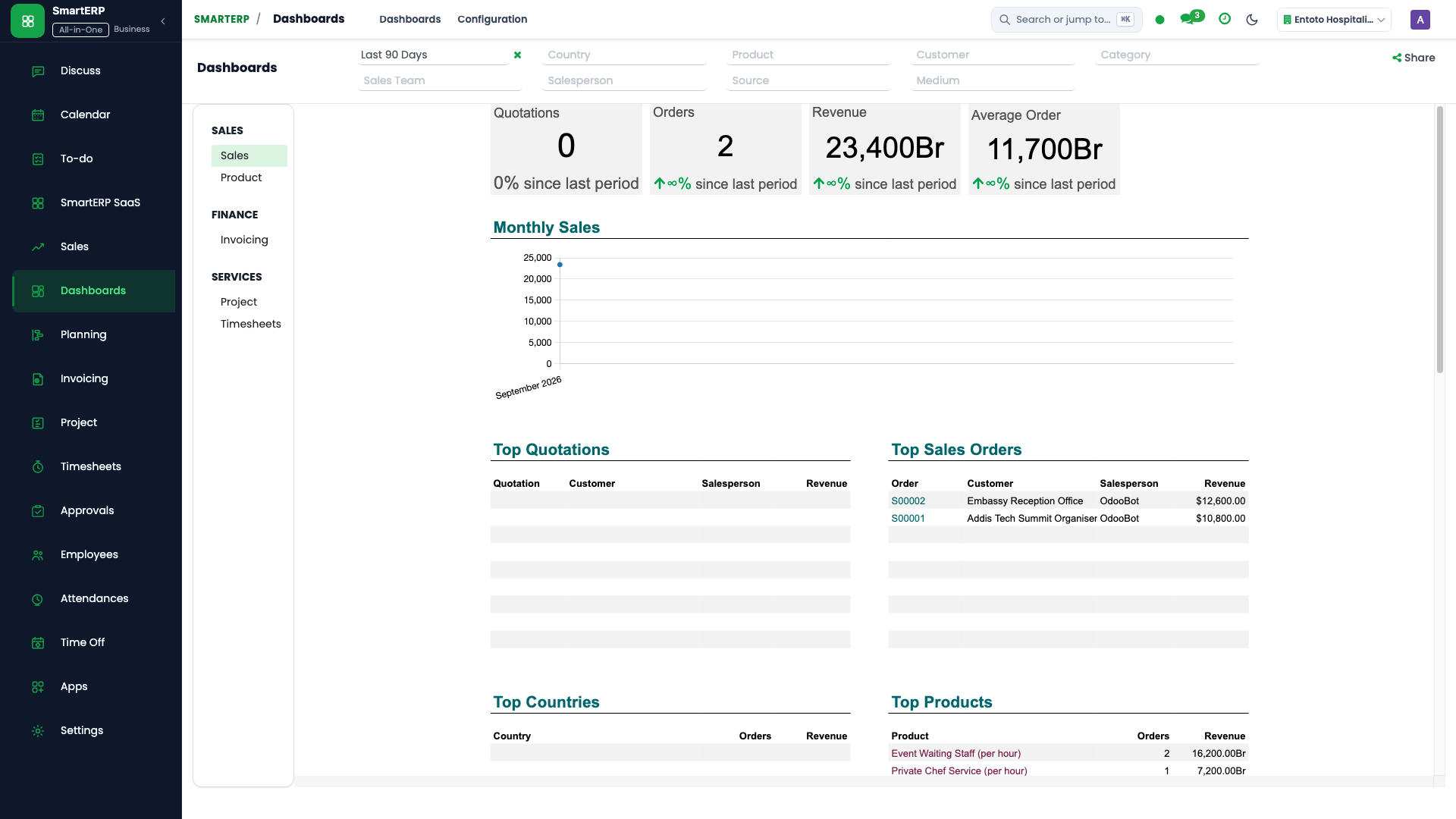
{screenshot:reports-and-dashboards-overview-dashboard}
2. Prerequisites & Security Access Groups#
- Required Modules:
hr, hr_payroll, hr_holidays, smarterp_ethiopian_payroll - Security Groups:
Officer: Manage all employees(Technical ID:hr.group_hr_user)Payroll Officer(Technical ID:hr_payroll.group_hr_payroll_user)HR Administrator(Technical ID:hr.group_hr_manager)
- Master Data Dependencies: Company departments, job positions, salary structures, 7-tier Ethiopian income tax brackets, POESSA/PSSPA pension rates, and employee contracts.
3. Step-by-Step Configuration & Execution#
Step 1: Navigating to the Module Interface#
- Log into your SmartERP instance at
https://smarterp.et/odoo. - Open the main App Switcher (grid icon in the top-left corner).
- Select the Employees app icon.
- From the top navigation bar, open Human Resources → Employees / Contracts / Attendance / Time Off / Payroll.
{screenshot:reports-and-dashboards-app-switcher-navigation}
Step 2: Creating and Parameterizing Records#
- Click the New button in the top-left control panel.
- Complete the mandatory fields in the record form:
- Employee Name (Mandatory): Legal employee name matching national identity card or passport
- Department & Job Position (Mandatory): Assigned administrative unit and official role title
- Contract / Salary Structure (Mandatory): Active employment contract defining basic salary and statutory allowances
- Taxpayer Identification Number (TIN) (Mandatory): Mandatory 10-digit MOR tax identifier for payroll declaration
- Configure optional operational parameters and localized tags as required:
- Pension Scheme Number (Optional): POESSA private or PSSPA public pension account number
- Bank Account Details (Optional): Commercial bank account number for direct net pay credit transfers
- Work Mobile & Email (Optional): Internal enterprise communication coordinates
- Click the Save icon in the control bar to commit the record.
{screenshot:reports-and-dashboards-record-creation-form}
Step 3: Validating and Processing Transactions#
- State Transitions: Execute operational state progression (Draft → Pending Review → Verified → Approved / Running → Closed).
- Ledger & System Impact: Payroll batch confirmation automatically generates composite salary expense, pension payable, and tax withholding journal entries in the General Ledger.
- Audit Verification: Automated recording of author ID, timestamp, and immutable revision history.
{screenshot:reports-and-dashboards-transaction-processing-state}
Core HR and Payroll KPI Matrix#
| Indicator Name | Frequency | Target Audience | Calculation Formula |
|---|---|---|---|
| Total Headcount | Real-time | HR Director, Board | Count of active employees with running contracts |
| Monthly Payroll Run Cost | Monthly | CFO, HR Director | Sum of basic wages + taxable/exempt allowances + 11% ER pension |
| Employee Turnover Rate | Monthly / Annual | HR Director | $\frac{\text{Departures in Period}}{\text{Average Headcount}} \times 100$ |
| Absenteeism Rate | Weekly | Department Heads | $\frac{\text{Unexcused Absent Days}}{\text{Total Scheduled Working Days}} \times 100$ |
| Overtime Cost Ratio | Monthly | Finance Manager | $\frac{\text{Total Overtime Payout}}{\text{Total Basic Wages}} \times 100$ |
| Average Tenure | Quarterly | HR Director | Average duration of employment across active staff |
Interactive Pivot and Graphic Views#
- Department Headcount Breakdown: Drill down by division, job position, and gender.
- Grade Distribution Pyramids: Visualize workforce distribution across the 8-tier grade matrix.
- Export Capabilities: Direct export to Excel and PDF for board meetings and labor ministry filings.
4. Advanced Configuration Points#
- Automated Actions & Scheduled Tasks (Crons):
HR: Compute scheduled leave accruals(hr_holidays.ir_cron_leave_accruals): Runs bi-weekly to accrue annual leave balances per Ethiopian labor lawPayroll: Auto-generate monthly payslip batches(hr_payroll.ir_cron_generate_payslips): Runs on the 25th of each calendar monthAttendance: Validate biometric clock-in logs(hr_attendance.ir_cron_sync_attendance): Runs hourly to sync biometric terminal events
- Custom Print Templates & Reports:
- Official Ethiopian Monthly Payslip
- POESSA / PSSPA Statutory Pension Contribution Schedule
- MOR Employment Income Tax (PAYE) Monthly Summary
- Employee Service & Severance Certificate
- Multi-Company Rules: Record-level security isolation under Company 1 (
Ashewa Technology Solutions S.C.), preventing cross-company ledger leakage across parent and subsidiary legal entities.
5. Comprehensive Troubleshooting Matrix#
| Error Symptom / Exception | Probable Root Cause | Corrective Action / Resolution |
|---|---|---|
Access Rights Error: Employee private data hidden | User lacks HR Officer security clearance. | Assign the user to hr.group_hr_user under Settings → Users & Companies. |
Computation Error: Missing contract or salary structure | Employee has no active contract in 'running' state. | Confirm contract terms under Employees → Contracts and ensure contract status is 'Running'. |
Validation Error: Leave allocation exhausted | Requested time off exceeds accrued balance under Ethiopian Labor Proclamation 1156/2019. | Review historical attendance and submit a formal allocation adjustment request. |
Payroll Blocked: Unlinked TIN or Pension number | Statutory rule requires mandatory tax and pension coordinates for payslip calculation. | Update the statutory tab on the employee profile with valid MOR and POESSA registration details. |
Next#
- Roles and permissions: Roles and permissions.
- Configuration: Configuration and settings.
Last updated: 2026-10-30