Enterprise ERP Integrations & Data Connectors
Automated live data pipelines from Accounting, Sales, CRM, Projects, HR, Fleet, and Industry modules into BSC KPIs using native Odoo 19 aggregations.
1. Overview & Business Value#
This comprehensive operational guide details the architecture, business workflows, configuration parameters, and execution steps for Enterprise ERP Integrations & Data Connectors within SmartERP.
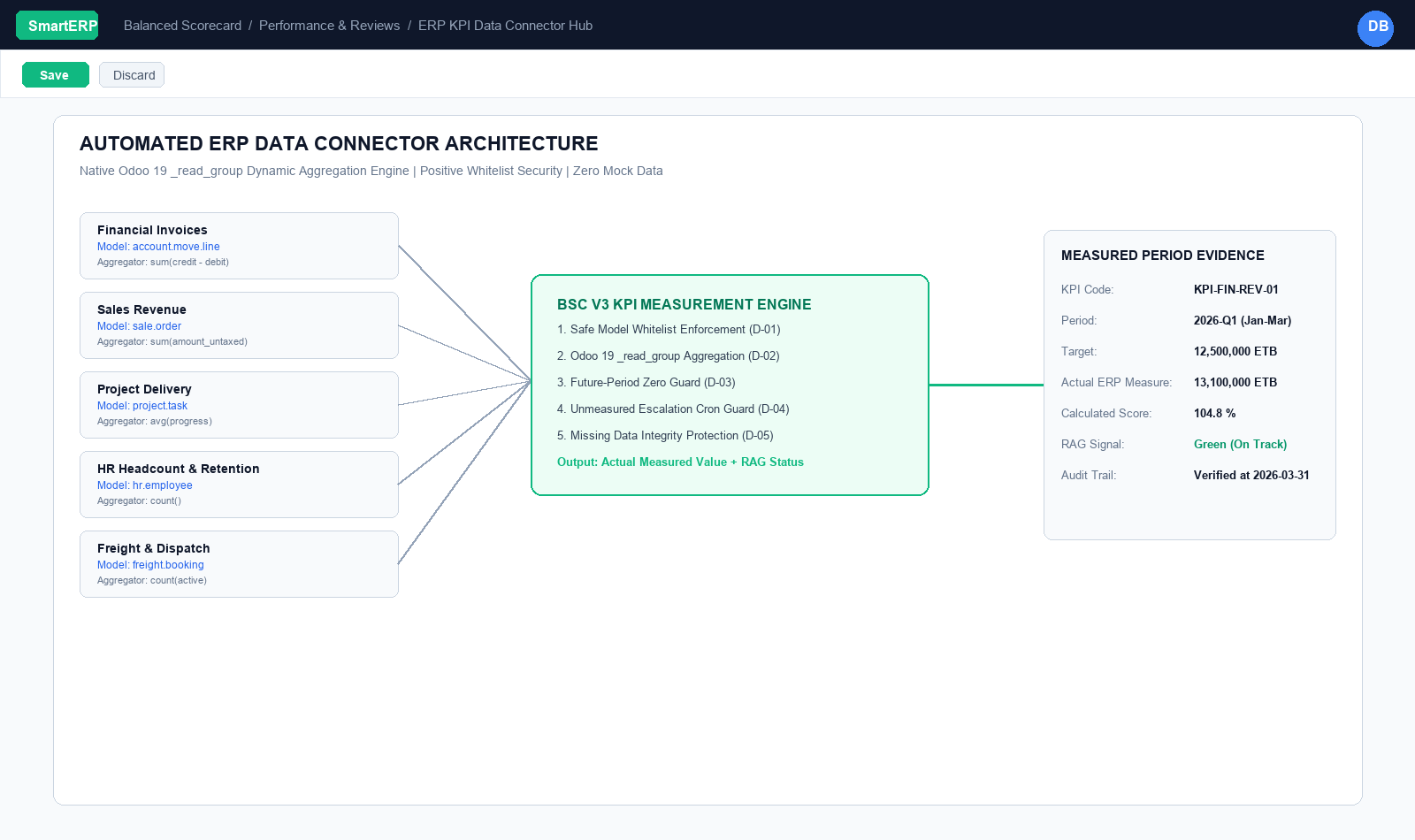
A balanced scorecard that relies on manual data entry quickly becomes obsolete or inaccurate. SmartERP 19 BSC V3 features an Automated ERP Data Connector Hub that pulls actual operational figures directly from database transactions in real-time.
{screenshot:enterprise-erp-integrations-overview-dashboard}
2. Prerequisites & Security Access Groups#
- Required Modules:
smarterp_balanced_scorecard, smarterp_strategy - Security Groups:
Strategy Officer(Technical ID:smarterp_balanced_scorecard.group_bsc_user)Strategy Director(Technical ID:smarterp_balanced_scorecard.group_bsc_manager)Executive Committee Member(Technical ID:smarterp_balanced_scorecard.group_bsc_executive)
- Master Data Dependencies: Strategic themes, 4 BSC perspectives (Financial, Customer, Internal Process, Learning & Growth), corporate KPIs, and quarterly appraisal periods.
3. Step-by-Step Configuration & Execution#
Step 1: Navigating to the Module Interface#
- Log into your SmartERP instance at
https://smarterp.et/odoo. - Open the main App Switcher (grid icon in the top-left corner).
- Select the Strategic Execution app icon.
- From the top navigation bar, open Strategic Execution → Perspectives → Strategic Objectives / KPIs / Action Plans.
{screenshot:enterprise-erp-integrations-app-switcher-navigation}
Step 2: Creating and Parameterizing Records#
- Click the New button in the top-left control panel.
- Complete the mandatory fields in the record form:
- Objective / KPI Name (Mandatory): Precise strategic outcome statement
- Perspective (Mandatory): One of the 4 balanced perspectives with mandated weighting
- Weight (%) (Mandatory): Percentage allocation contributing to overall perspective score
- Target Value & Baseline (Mandatory): Quantifiable numerical goal and historical starting point
- Configure optional operational parameters and localized tags as required:
- Calculation Formula (Optional): Automated SQL query or module model metric extraction
- Initiative Champion (Optional): Department head or senior manager accountable for result
- Review Frequency (Optional): Monthly, quarterly, or annual appraisal cadence
- Click the Save icon in the control bar to commit the record.
{screenshot:enterprise-erp-integrations-record-creation-form}
Step 3: Validating and Processing Transactions#
- State Transitions: Execute operational state progression (Draft → Active Target → Mid-Term Review → Final Appraisal → Locked).
- Ledger & System Impact: Financial perspective KPIs dynamically read General Ledger balances, revenue growth metrics, and cost ratios directly from the accounting engine.
- Audit Verification: Automated recording of author ID, timestamp, and immutable revision history.
{screenshot:enterprise-erp-integrations-transaction-processing-state}
Odoo 19 Native Dynamic Aggregation Engine#
In legacy Odoo 17 and 18, cross-model metric calculations relied on the deprecated read_group() method, which could ignore requested formulas in favor of a field's default operator.
BSC V3 uses Odoo 19's native _read_group() API:
# Native Odoo 19 Dynamic Aggregation Pipeline:
domain = safe_eval(kpi.source_domain or "[]")
# Automatically injects period calendar boundaries:
domain += [
    (date_field, ">=", period.date_start),
    (date_field, "<=", period.date_end),
]

# Executes dynamic aggregation query:
results = env[kpi.source_model_id.model]._read_group(
    domain=domain,
    aggregates=[f"{measure_field}:{aggregator}"],  # e.g. "price_subtotal:sum"
)
actual_value = results[0][0] if results else 0.0
Supported aggregators include:
sum: Total volume (e.g., total sales revenue, total freight weight).avg: Average performance (e.g., average invoice processing duration, average task satisfaction).count: Record count (e.g., number of won enterprise leads, active student enrollments).min/max: Boundary measurements (e.g., minimum SLA uptime, maximum delivery transit delay).
Security Model: Positive Model Allowlist#
Because the KPI engine executes queries across database tables, security is paramount. In earlier drafts, unrestrained sudo() lookups could theoretically allow an unauthorized user to query confidential executive payroll or credential tables.
BSC V3 enforces a Strict Positive Allowlist & Deny Guard:
# Safe Model Security Allowlist:
ALLOWED_SOURCE_MODELS = {
    "account.move", "account.move.line",
    "sale.order", "sale.order.line",
    "crm.lead",
    "project.project", "project.task",
    "hr.employee", "hr.department", "hr.leave",
    "stock.picking", "stock.move",
    "mrp.production",
    "fleet.vehicle", "freight.booking",
    "sacco.loan", "sacco.member",
}

DENIED_MODELS = {
    "res.users", "res.company", "ir.model", "hr.payslip", "hr.contract"
}
If an administrator or user attempts to point a KPI source model to a denied or non-allowlisted table, the system blocks the save and displays a clear security notification:
"Access Denied: The requested model is restricted from automated BSC KPI queries for data governance and privacy."
Standard SmartERP App Connectors#
1. Financial & Invoicing Integration (account.move.line)#
- KPI Metrics: Monthly Gross Revenue, Operating Expenses, Gross Margin %, Cash Receipts.
- Filter Domain:
[('move_id.state', '=', 'posted'), ('account_id.account_type', '=', 'income')] - Measure Field:
credit - debit(orbalance) - Live Advantage: Monthly financial actuals reflect audited general ledger lines the instant an accountant posts an invoice, eliminating spreadsheet recalculations.
2. Commercial Sales & CRM (sale.order, crm.lead)#
- KPI Metrics: Net New Annual Recurring Revenue (ARR), Win Rate %, Average Deal Size, Lead Velocity.
- Filter Domain:
[('state', 'in', ['sale', 'done']), ('team_id.name', '=', 'Enterprise Sales')] - Measure Field:
amount_untaxedwithsumaggregator.
3. Project Management & Engineering Delivery (project.task)#
- KPI Metrics: Strategic Milestone Velocity, Sprint Delivery Rate %, Open Priority Bug Count.
- Filter Domain:
[('project_id.is_strategic', '=', True), ('state', '=', '1_done')] - Measure Field:
effective_hoursorcount.
4. Human Resources & Talent (hr.employee)#
- KPI Metrics: Headcount Growth, Voluntary Turnover %, Training Completion Rate.
- Filter Domain:
[('active', '=', True), ('department_id', '=', dept_id)] - Measure Field:
id:count.
5. Fleet & Logistics Operations (freight.booking, fleet.vehicle)#
- KPI Metrics: On-Time Corridor Transit Delivery %, Modjo Dry Port Clearance Turnaround, Heavy Hauler Fleet Utilization.
- Filter Domain:
[('stage', '=', 'delivered')]
Automated Data Synchronization Cron#
KPI values do not require manual button clicks. SmartERP BSC V3 ships with two pre-configured background cron workers:
- KPI Data Connector Sync (
ir.cron.bsc.kpi.fetch):- Runs nightly at 00:00.
- Scans all active scorecards, identifies the current elapsed calendar period, queries the live ERP tables using the configured domain, and updates the
actual_valuefield.
- Red-KPI Escalation Monitor (
ir.cron.bsc.escalation):- Evaluates newly measured periods.
- If a critical KPI scores $< 70.0\%$ (Red zone), the system creates an automated activity on the responsible executive's dashboard and logs a chatter alert notifying the accountable manager.
4. Advanced Configuration Points#
- Automated Actions & Scheduled Tasks (Crons):
BSC: Calculate quarterly KPI achievements(smarterp_bsc.ir_cron_compute_kpi): Runs quarterly on the 5th to compute composite achievement scoresBSC: Issue appraisal cascade reminders(smarterp_bsc.ir_cron_appraisal_alert): Runs monthly to remind objective champions to update progress
- Custom Print Templates & Reports:
- Institutional Balanced Scorecard Executive Dashboard
- Departmental Strategic Cascade Matrix
- KPI Performance Variance & Trend Analysis
- Corporate Strategy Execution Summary
- Multi-Company Rules: Record-level security isolation under Company 1 (
Ashewa Technology Solutions S.C.), preventing cross-company ledger leakage across parent and subsidiary legal entities.
5. Comprehensive Troubleshooting Matrix#
| Error Symptom / Exception | Probable Root Cause | Corrective Action / Resolution |
|---|---|---|
Weighting Error: Perspective weights do not equal 100% | Total weights assigned to objectives within perspective fail to sum to 100.00%. | Adjust individual objective weightings so the perspective total equals exactly 100%. |
Data Feed Error: Automated KPI metric returned null | Underlying model query failed or target database view has no records. | Verify connected model name and filter domain in the KPI automated calculation parameters. |
Lockout Error: Period results locked for executive review | Current appraisal quarter has been locked by the Strategy Director. | Obtain written authorization and request temporary unlock from the Strategy Director. |