Strategic Initiatives & Capex/Opex Allocations
Step 7 of the BSC framework — linking strategic objectives to funded capital (Capex) and operational (Opex) resource envelopes, ROI metrics, and project execution.
1. Overview & Business Value#
This comprehensive operational guide details the architecture, business workflows, configuration parameters, and execution steps for Strategic Initiatives & Capex/Opex Allocations within SmartERP.
Strategic Initiatives & Capex/Opex Allocations#
Objectives tell you where you want to go; Key Performance Indicators tell you if you are getting there; but Strategic Initiatives (bsc.initiative) are the engines that actually get you there. In SmartERP 19 BSC, initiatives represent funded programs with committed budgets and accountable owners.
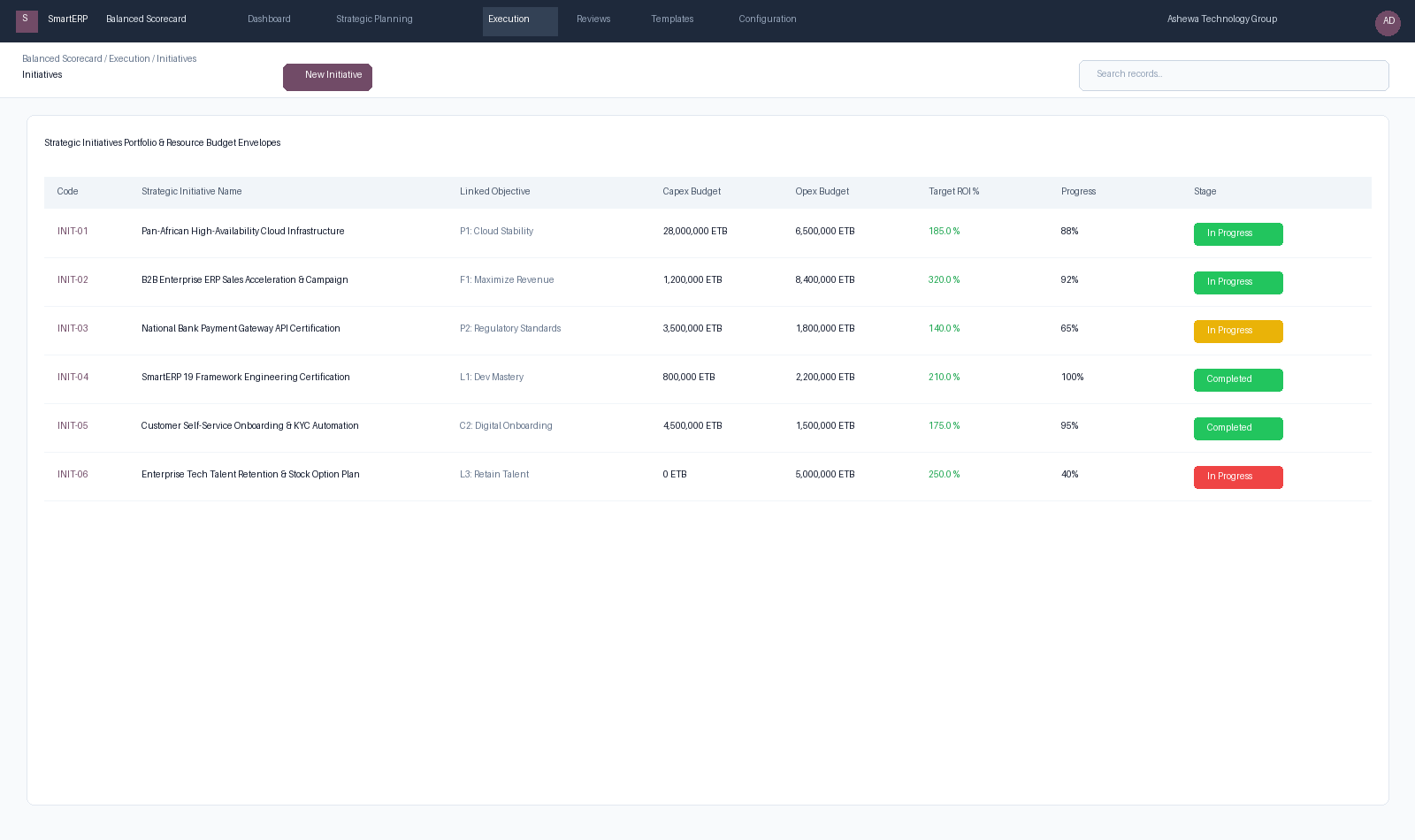
Figure 6.4: Strategic Initiatives Portfolio tracking Capex, Opex, target ROI %, and project execution milestones.
{screenshot:strategic-initiatives-and-budgets-overview-dashboard}
2. Prerequisites & Security Access Groups#
- Required Modules:
smarterp_balanced_scorecard, smarterp_strategy - Security Groups:
Strategy Officer(Technical ID:smarterp_balanced_scorecard.group_bsc_user)Strategy Director(Technical ID:smarterp_balanced_scorecard.group_bsc_manager)Executive Committee Member(Technical ID:smarterp_balanced_scorecard.group_bsc_executive)
- Master Data Dependencies: Strategic themes, 4 BSC perspectives (Financial, Customer, Internal Process, Learning & Growth), corporate KPIs, and quarterly appraisal periods.
3. Step-by-Step Configuration & Execution#
Step 1: Navigating to the Module Interface#
- Log into your SmartERP instance at
https://smarterp.et/odoo. - Open the main App Switcher (grid icon in the top-left corner).
- Select the Strategic Execution app icon.
- From the top navigation bar, open Strategic Execution → Perspectives → Strategic Objectives / KPIs / Action Plans.
{screenshot:strategic-initiatives-and-budgets-app-switcher-navigation}
Step 2: Creating and Parameterizing Records#
- Click the New button in the top-left control panel.
- Complete the mandatory fields in the record form:
- Objective / KPI Name (Mandatory): Precise strategic outcome statement
- Perspective (Mandatory): One of the 4 balanced perspectives with mandated weighting
- Weight (%) (Mandatory): Percentage allocation contributing to overall perspective score
- Target Value & Baseline (Mandatory): Quantifiable numerical goal and historical starting point
- Configure optional operational parameters and localized tags as required:
- Calculation Formula (Optional): Automated SQL query or module model metric extraction
- Initiative Champion (Optional): Department head or senior manager accountable for result
- Review Frequency (Optional): Monthly, quarterly, or annual appraisal cadence
- Click the Save icon in the control bar to commit the record.
{screenshot:strategic-initiatives-and-budgets-record-creation-form}
Step 3: Validating and Processing Transactions#
- State Transitions: Execute operational state progression (Draft → Active Target → Mid-Term Review → Final Appraisal → Locked).
- Ledger & System Impact: Financial perspective KPIs dynamically read General Ledger balances, revenue growth metrics, and cost ratios directly from the accounting engine.
- Audit Verification: Automated recording of author ID, timestamp, and immutable revision history.
{screenshot:strategic-initiatives-and-budgets-transaction-processing-state}
1. Initiative Budget Envelopes: Capex vs. Opex#
To maintain strict financial governance, every initiative separates its resource requirements into two audited envelopes:
- Capital Expenditure (Capex):
- Long-term assets, infrastructure investments, software platform purchases, or physical hardware (e.g., 28,000,000 ETB for High-Availability Multi-Region Cloud Servers).
- Operational Expenditure (Opex):
- Ongoing delivery expenses, training bootcamps, consulting fees, advertising campaigns, and staff overtime (e.g., 6,500,000 ETB for Cloud Hosting & Bandwidth Operations).
Quantifying Strategic Return on Investment (ROI %)#
Every initiative includes an expected ROI target: $$\text{Expected ROI \%} = \frac{\text{Projected Strategic Net Value}}{\text{Total Capex} + \text{Total Opex}} \times 100$$
This allows the Chief Executive and Investment Committee to rank competing initiatives by capital efficiency and prioritize execution resources.
2. Linking Initiatives to Live Projects (project.project)#
Rather than maintaining a parallel task list, SmartERP BSC natively integrates with the SmartERP Project Management suite:
- Planners can link an initiative directly to a real project (
project_id). - The initiative's Progress % automatically synchronizes with completed tasks, deliverable milestones, and timesheet entries recorded by frontline engineering teams.
- Initiatives flagged as critical milestones feed directly into the Strategic Command Center and executive dashboards.
4. Advanced Configuration Points#
- Automated Actions & Scheduled Tasks (Crons):
BSC: Calculate quarterly KPI achievements(smarterp_bsc.ir_cron_compute_kpi): Runs quarterly on the 5th to compute composite achievement scoresBSC: Issue appraisal cascade reminders(smarterp_bsc.ir_cron_appraisal_alert): Runs monthly to remind objective champions to update progress
- Custom Print Templates & Reports:
- Institutional Balanced Scorecard Executive Dashboard
- Departmental Strategic Cascade Matrix
- KPI Performance Variance & Trend Analysis
- Corporate Strategy Execution Summary
- Multi-Company Rules: Record-level security isolation under Company 1 (
Ashewa Technology Solutions S.C.), preventing cross-company ledger leakage across parent and subsidiary legal entities.
5. Comprehensive Troubleshooting Matrix#
| Error Symptom / Exception | Probable Root Cause | Corrective Action / Resolution |
|---|---|---|
Weighting Error: Perspective weights do not equal 100% | Total weights assigned to objectives within perspective fail to sum to 100.00%. | Adjust individual objective weightings so the perspective total equals exactly 100%. |
Data Feed Error: Automated KPI metric returned null | Underlying model query failed or target database view has no records. | Verify connected model name and filter domain in the KPI automated calculation parameters. |
Lockout Error: Period results locked for executive review | Current appraisal quarter has been locked by the Strategy Director. | Obtain written authorization and request temporary unlock from the Strategy Director. |