Annual Operating Plans (AOP) & Resource Envelopes
Bridging multi-year strategic visions to fiscal execution cycles, Capex and Opex budget envelopes, initiative resource tracking, and ROI calculations.
1. Overview & Business Value#
This comprehensive operational guide details the architecture, business workflows, configuration parameters, and execution steps for Annual Operating Plans (AOP) & Resource Envelopes within SmartERP.
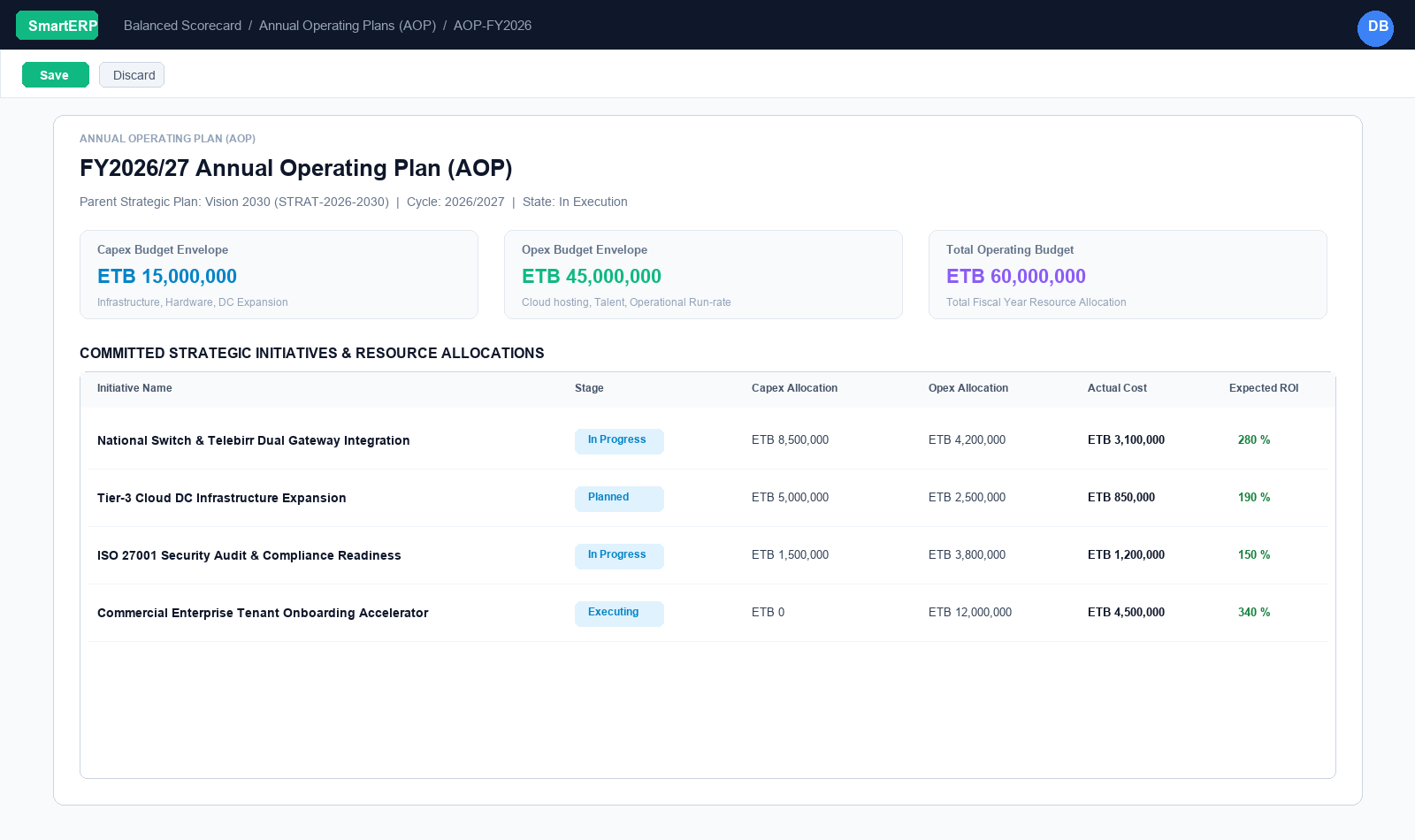
A five-year strategic plan is impossible to execute all at once. Organizations achieve long-term goals by translating them into single-year fiscal operational cycles.
In SmartERP 19 BSC V3, the Annual Operating Plan (AOP) (bsc.annual.plan) acts as the critical bridge connecting decadal visions down to annual budgets, departmental commitments, and resource allocations.
{screenshot:annual-operating-plans-and-budgets-overview-dashboard}
2. Prerequisites & Security Access Groups#
- Required Modules:
smarterp_balanced_scorecard, smarterp_strategy - Security Groups:
Strategy Officer(Technical ID:smarterp_balanced_scorecard.group_bsc_user)Strategy Director(Technical ID:smarterp_balanced_scorecard.group_bsc_manager)Executive Committee Member(Technical ID:smarterp_balanced_scorecard.group_bsc_executive)
- Master Data Dependencies: Strategic themes, 4 BSC perspectives (Financial, Customer, Internal Process, Learning & Growth), corporate KPIs, and quarterly appraisal periods.
3. Step-by-Step Configuration & Execution#
Step 1: Navigating to the Module Interface#
- Log into your SmartERP instance at
https://smarterp.et/odoo. - Open the main App Switcher (grid icon in the top-left corner).
- Select the Strategic Execution app icon.
- From the top navigation bar, open Strategic Execution → Perspectives → Strategic Objectives / KPIs / Action Plans.
{screenshot:annual-operating-plans-and-budgets-app-switcher-navigation}
Step 2: Creating and Parameterizing Records#
- Click the New button in the top-left control panel.
- Complete the mandatory fields in the record form:
- Objective / KPI Name (Mandatory): Precise strategic outcome statement
- Perspective (Mandatory): One of the 4 balanced perspectives with mandated weighting
- Weight (%) (Mandatory): Percentage allocation contributing to overall perspective score
- Target Value & Baseline (Mandatory): Quantifiable numerical goal and historical starting point
- Configure optional operational parameters and localized tags as required:
- Calculation Formula (Optional): Automated SQL query or module model metric extraction
- Initiative Champion (Optional): Department head or senior manager accountable for result
- Review Frequency (Optional): Monthly, quarterly, or annual appraisal cadence
- Click the Save icon in the control bar to commit the record.
{screenshot:annual-operating-plans-and-budgets-record-creation-form}
Step 3: Validating and Processing Transactions#
- State Transitions: Execute operational state progression (Draft → Active Target → Mid-Term Review → Final Appraisal → Locked).
- Ledger & System Impact: Financial perspective KPIs dynamically read General Ledger balances, revenue growth metrics, and cost ratios directly from the accounting engine.
- Audit Verification: Automated recording of author ID, timestamp, and immutable revision history.
{screenshot:annual-operating-plans-and-budgets-transaction-processing-state}
The Strategic-to-Operational Bridge#
Without an Annual Operating Plan, companies suffer from the classic "strategy-budget disconnect":
- Leadership sets an ambitious 5-year growth vision.
- The finance department separately prepares an annual budget based purely on historic line items.
- Department managers execute day-to-day work based on immediate firefighting rather than strategic milestones.
The AOP solves this by enforcing that:
- Every AOP explicitly points to a parent Strategic Plan (
strategic_plan_id). - Capital Expenditure (Capex) and Operating Expenditure (Opex) envelopes are formally ring-fenced for strategic programs.
- Departmental scorecards for that calendar year cascade directly from the AOP.
Configuring an Annual Operating Plan#
- Navigate to Balanced Scorecard $\rightarrow$ Strategic Planning $\rightarrow$ Annual Operating Plans (AOP).
- Click New.
- Specify:
- Annual Plan Name: (e.g., FY2026/27 Annual Operating Plan (AOP)).
- AOP Code: Unique identifier (e.g.,
AOP-FY2026), enforced unique per company. - Parent Strategic Plan: The governing 3-, 5-, or 10-year strategy (e.g., Vision 2030).
- Fiscal Year / Cycle: (e.g.,
2026/2027orFY2026). - Date Start & Date End: The fiscal operating dates (e.g.,
2026-07-08to2027-07-07for Ethiopian fiscal year, or standard calendar year). - Accountable Executive: The Chief Operating Officer (COO), Chief Financial Officer (CFO), or assigned execution director.
- Under Key Operating Priorities & Directives, document the top 3–5 executive focus areas for the year (e.g., "Accelerate regional enterprise tenant acquisition while maintaining a 99.95% system uptime SLA").
Budget Envelopes: Capex vs. Opex#
SmartERP BSC V3 categorizes strategic funding into two distinct resource envelopes:
$$\text{Total Operating Budget} = \text{Allocated Capex Envelope} + \text{Allocated Opex Envelope}$$
| Resource Envelope | Definition | Examples in Strategy Execution |
|---|---|---|
| Allocated Capex (Capital Expenditure) | Long-term capital investments that create enduring balance sheet assets. | Purchasing enterprise data center server racks, acquiring proprietary software licenses, constructing physical facility branches, procuring specialized heavy freight vehicles. |
| Allocated Opex (Operating Expenditure) | Ongoing operational costs consumed within the single fiscal operating cycle. | Cloud hosting and bandwidth consumption, engineering and sales payroll, marketing campaigns, third-party security audits, specialized consulting retainers. |
| Total Operating Budget | The total financial commitment authorized by the Board for that fiscal year. | Automatically computed by the system as the sum of Capex and Opex envelopes. |
Strategic Initiatives & Resource Tracking#
An initiative (bsc.initiative) is an actionable program designed to close a strategic performance gap. Under BSC V3, initiatives link directly to the AOP:
flowchart LR
    A["Annual Operating Plan (AOP)<br/>Total Budget: 60M ETB"] --> B["Initiative 1: Dual Gateway<br/>Capex: 8.5M | Opex: 4.2M"]
    A --> C["Initiative 2: Cloud DC Expansion<br/>Capex: 5.0M | Opex: 2.5M"]
    A --> D["Initiative 3: ISO 27001 Readiness<br/>Capex: 1.5M | Opex: 3.8M"]
    B --> E["Linked Deliverable Milestone"]
    C --> E
    D --> E
Enhanced Initiative Attributes#
- Strategic Linkages: Linked bidirectionally to parent
plan_id,annual_plan_id, and deliverymilestone_id. - Resource Allocations: Explicit Allocated Capex and Allocated Opex fields.
- Actual Cost Incurred: Aggregated actual expenditures incurred to date, verified against general ledger project analytic accounts.
- Expected ROI %: Expected return on investment percentage (e.g.,
280%), used by executive leadership to prioritize competing project proposals. - Strategic Value Tier: Classified as
Game Changer,Core Enabler, orOperational Hygiene.
AOP State Workflow & Audit Lock#
Annual Operating Plans advance through four monitored states:
- Draft: Finance and operations are modeling budget envelopes and gathering initiative estimates.
- Under Review: Submitted to the CFO and Board Budget Committee for review.
- Approved: Formally authorized. Budget envelopes become official fiscal ceilings.
- Executing: Live operations. Actual costs and scorecard performance metrics accumulate in real-time.
- Closed: End of fiscal year. Performance against budget is archived, and remaining open initiatives roll over into the subsequent fiscal AOP.
4. Advanced Configuration Points#
- Automated Actions & Scheduled Tasks (Crons):
BSC: Calculate quarterly KPI achievements(smarterp_bsc.ir_cron_compute_kpi): Runs quarterly on the 5th to compute composite achievement scoresBSC: Issue appraisal cascade reminders(smarterp_bsc.ir_cron_appraisal_alert): Runs monthly to remind objective champions to update progress
- Custom Print Templates & Reports:
- Institutional Balanced Scorecard Executive Dashboard
- Departmental Strategic Cascade Matrix
- KPI Performance Variance & Trend Analysis
- Corporate Strategy Execution Summary
- Multi-Company Rules: Record-level security isolation under Company 1 (
Ashewa Technology Solutions S.C.), preventing cross-company ledger leakage across parent and subsidiary legal entities.
5. Comprehensive Troubleshooting Matrix#
| Error Symptom / Exception | Probable Root Cause | Corrective Action / Resolution |
|---|---|---|
Weighting Error: Perspective weights do not equal 100% | Total weights assigned to objectives within perspective fail to sum to 100.00%. | Adjust individual objective weightings so the perspective total equals exactly 100%. |
Data Feed Error: Automated KPI metric returned null | Underlying model query failed or target database view has no records. | Verify connected model name and filter domain in the KPI automated calculation parameters. |
Lockout Error: Period results locked for executive review | Current appraisal quarter has been locked by the Strategy Director. | Obtain written authorization and request temporary unlock from the Strategy Director. |