Strategic Risk Registry & Scenario Modeling
Quantitative 5x5 Inherent vs. Residual risk heatmaps, Key Risk Indicators (KRIs), macro scenario simulations, and executive strategy review governance.
1. Overview & Business Value#
This comprehensive operational guide details the architecture, business workflows, configuration parameters, and execution steps for Strategic Risk Registry & Scenario Modeling within SmartERP.
Strategy execution without dynamic risk management is fragile. Disruptions—such as foreign exchange fluctuations, sovereign regulatory shifts, or technology shocks—can derail a five-year plan in a matter of weeks.
SmartERP 19 BSC V3 integrates a dedicated Strategic Risk Registry and Scenario Modeling Center directly into corporate performance governance.
{screenshot:strategic-risk-and-scenario-modeling-overview-dashboard}
2. Prerequisites & Security Access Groups#
- Required Modules:
smarterp_balanced_scorecard, smarterp_strategy - Security Groups:
Strategy Officer(Technical ID:smarterp_balanced_scorecard.group_bsc_user)Strategy Director(Technical ID:smarterp_balanced_scorecard.group_bsc_manager)Executive Committee Member(Technical ID:smarterp_balanced_scorecard.group_bsc_executive)
- Master Data Dependencies: Strategic themes, 4 BSC perspectives (Financial, Customer, Internal Process, Learning & Growth), corporate KPIs, and quarterly appraisal periods.
3. Step-by-Step Configuration & Execution#
Step 1: Navigating to the Module Interface#
- Log into your SmartERP instance at
https://smarterp.et/odoo. - Open the main App Switcher (grid icon in the top-left corner).
- Select the Strategic Execution app icon.
- From the top navigation bar, open Strategic Execution → Perspectives → Strategic Objectives / KPIs / Action Plans.
{screenshot:strategic-risk-and-scenario-modeling-app-switcher-navigation}
Step 2: Creating and Parameterizing Records#
- Click the New button in the top-left control panel.
- Complete the mandatory fields in the record form:
- Objective / KPI Name (Mandatory): Precise strategic outcome statement
- Perspective (Mandatory): One of the 4 balanced perspectives with mandated weighting
- Weight (%) (Mandatory): Percentage allocation contributing to overall perspective score
- Target Value & Baseline (Mandatory): Quantifiable numerical goal and historical starting point
- Configure optional operational parameters and localized tags as required:
- Calculation Formula (Optional): Automated SQL query or module model metric extraction
- Initiative Champion (Optional): Department head or senior manager accountable for result
- Review Frequency (Optional): Monthly, quarterly, or annual appraisal cadence
- Click the Save icon in the control bar to commit the record.
{screenshot:strategic-risk-and-scenario-modeling-record-creation-form}
Step 3: Validating and Processing Transactions#
- State Transitions: Execute operational state progression (Draft → Active Target → Mid-Term Review → Final Appraisal → Locked).
- Ledger & System Impact: Financial perspective KPIs dynamically read General Ledger balances, revenue growth metrics, and cost ratios directly from the accounting engine.
- Audit Verification: Automated recording of author ID, timestamp, and immutable revision history.
{screenshot:strategic-risk-and-scenario-modeling-transaction-processing-state}
The $5 \times 5$ Strategic Risk Heatmap Engine#
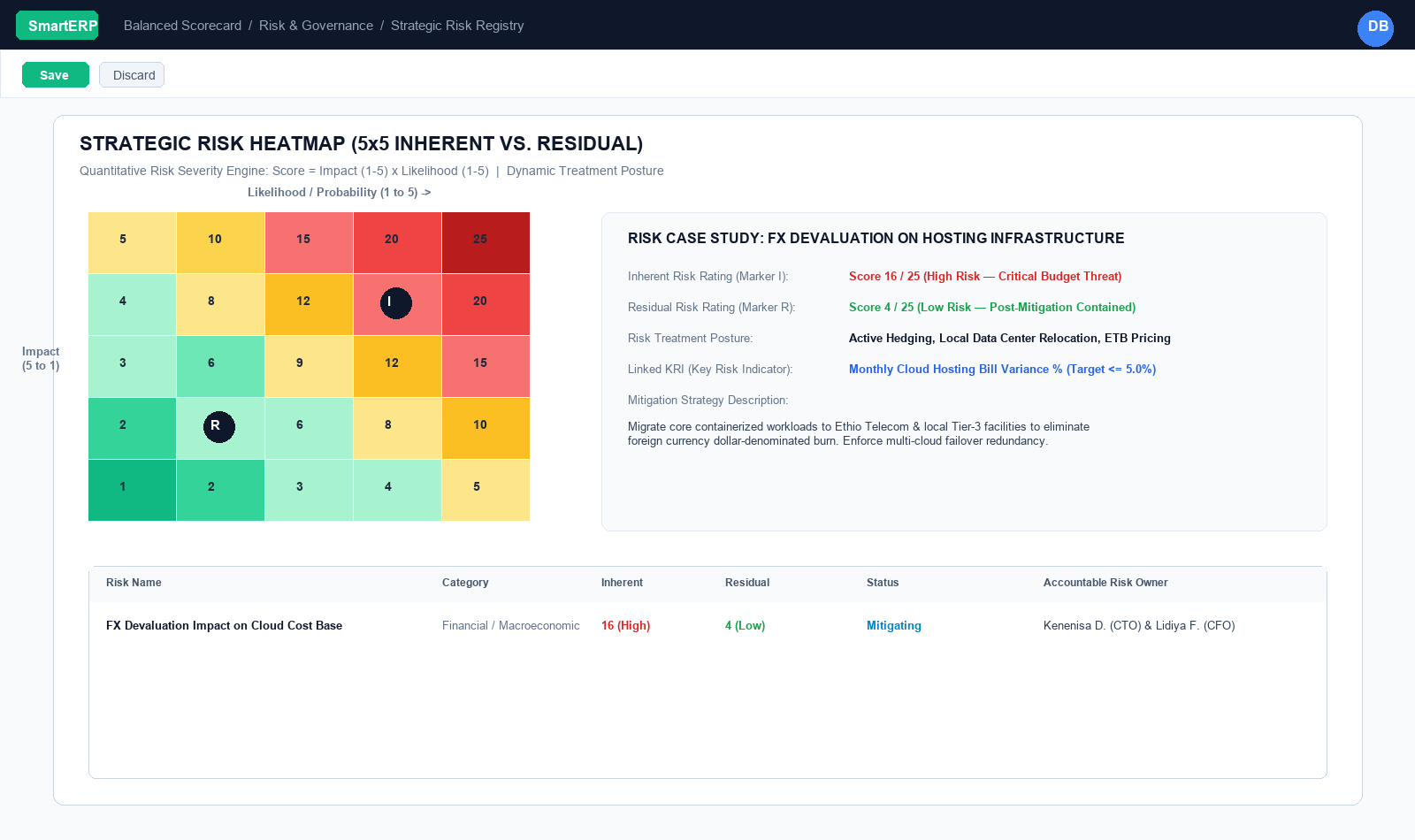
Under Balanced Scorecard $\rightarrow$ Risk & Governance $\rightarrow$ Strategic Risk Registry, organizations track risks (bsc.risk) using a two-dimensional quantitative matrix:
$$\text{Risk Severity Score} = \text{Impact (1 to 5)} \times \text{Likelihood / Probability (1 to 5)}$$
Risk Ratings & Severity Bands#
| Score Range | Risk Rating | Color Code | Action Required |
|---|---|---|---|
| 16 – 25 | Critical / High | Red | Immediate executive intervention required. Mandatory mitigation plan; reviewed bi-weekly at the Board/ExCo level. |
| 10 – 15 | Medium | Yellow / Amber | Active monitoring required. Department head owns ongoing control measures and quarterly updates. |
| 1 – 9 | Low | Green | Routine operational containment. Standard standard operating procedures (SOPs) suffice. |
Inherent Risk vs. Residual Risk#
A central innovation in SmartERP BSC V3 is distinguishing between where a risk starts and where it stands after executive intervention:
[ Inherent Risk: Impact 4 x Likelihood 4 = Score 16 (High) ]
                          │
         [ Executive Mitigation Actions & Controls Applied ]
                          ▼
[ Residual Risk: Impact 2 x Likelihood 2 = Score 4 (Low) ]- Inherent Risk Score: The gross level of exposure before any controls or safeguards are applied.
- Example: Exposure to foreign exchange devaluation on dollar-denominated cloud hosting (Impact: 4, Likelihood: 4 $\rightarrow$ Score: 16).
- Mitigation Strategy & Controls: Concrete interventions logged in the system (e.g., Migrate containerized workloads to local Tier-3 hosting, hedge currency contracts, invoice enterprise clients with currency adjustment clauses).
- Residual Risk Score: The net remaining exposure after the mitigation strategy is successfully executed (Impact: 2, Likelihood: 2 $\rightarrow$ Score: 4).
The system stores both states and visually displays the containment trajectory, giving auditors and board members immediate evidence that leadership is actively de-risking the enterprise.
Risk Treatment Postures & Key Risk Indicators (KRIs)#
1. Risk Treatment Strategies#
Every logged risk must specify a definitive Risk Treatment:
- Mitigate (Treat): Implement operational safeguards and redundant systems to reduce impact or likelihood.
- Avoid (Terminate): Exit the high-risk operational activity, market, or product line entirely.
- Transfer (Share): Shift financial exposure to third parties via insurance policies, performance bonds, or hedging contracts.
- Accept (Tolerate): Acknowledge the exposure where mitigation costs exceed the potential loss, monitoring the threshold continuously.
2. Linking Key Risk Indicators (KRIs)#
A risk in SmartERP is not just a descriptive text record—it connects directly to quantitative metrics. Planners link risks directly to Key Risk Indicators (kri_kpi_ids) pointing to bsc.kpi records:
- Risk: High Customer Churn due to Platform Latency.
- Linked KRI:
Core System Response Time (p95)andMonthly Churn Rate %. - Automation: If the KRI falls into the Red RAG zone, the system automatically flags the linked Strategic Risk as High Urgency on the executive dashboard.
Strategic Scenario Modeling#
Under Risk & Governance $\rightarrow$ Scenario Modeling, strategic planners simulate how corporate targets perform under divergent macro-economic conditions (bsc.scenario):
| Scenario Type | Definition | Probability % | Projected Revenue Variance | Projected Cost Variance |
|---|---|---|---|---|
| Base Case | Expected baseline operating trajectory assuming current macro assumptions hold. | 50.0% | $0.0\%$ (Target) | $0.0\%$ (Target) |
| Bull Case (Growth Acceleration) | Rapid market adoption, favorable regulatory reforms, unexpected competitor exits. | 25.0% | $+40.0\%$ to $+60.0\%$ | $+15.0\%$ to $+25.0\%$ |
| Bear Case (Downturn) | Slower enterprise sales cycles, credit contractions, inflation pressures. | 15.0% | $-20.0\%$ to $-35.0\%$ | $+10.0\%$ to $+20.0\%$ |
| Macro Stress Test | Severe currency devaluation, supply chain embargo, critical infrastructure disruption. | 10.0% | $-40.0\%$ to $-60.0\%$ | $+30.0\%$ to $+50.0\%$ |
| Technological Disruption | Leapfrog technology changes customer behavior, requiring rapid business model transformation. | Variable | Dependent on model | Dependent on model |
Planners document Pre-Approved Contingency Triggers on each scenario card (e.g., "If foreign exchange inflation exceeds 30% for two consecutive quarters, automatically trigger the contingency budget freeze and pause non-critical Capex initiatives").
Executive Strategy Reviews & Decision Governance#
Strategies cannot remain static. SmartERP BSC V3 provides a dedicated governance workflow for Strategy Reviews (bsc.strategy.review):
- Review Types:
Quarterly Performance Review (QPR),Annual Strategic Refresh,Emergency Pivot Session. - Meeting Structure: Records the Executive Chair, review date, attendees (
res.users), and the overall corporate RAG status. - Executive Discussion Log: Documents diagnostic debates, operational headwinds, and strategic insights.
- Decisions & Approved Pivots Log: Formal, legally auditable record of board-authorized strategy pivots, budget reallocations, or scope changes.
- Action Items Queue: Concrete remedial tasks assigned to specific accountable executives with firm deadlines.
4. Advanced Configuration Points#
- Automated Actions & Scheduled Tasks (Crons):
BSC: Calculate quarterly KPI achievements(smarterp_bsc.ir_cron_compute_kpi): Runs quarterly on the 5th to compute composite achievement scoresBSC: Issue appraisal cascade reminders(smarterp_bsc.ir_cron_appraisal_alert): Runs monthly to remind objective champions to update progress
- Custom Print Templates & Reports:
- Institutional Balanced Scorecard Executive Dashboard
- Departmental Strategic Cascade Matrix
- KPI Performance Variance & Trend Analysis
- Corporate Strategy Execution Summary
- Multi-Company Rules: Record-level security isolation under Company 1 (
Ashewa Technology Solutions S.C.), preventing cross-company ledger leakage across parent and subsidiary legal entities.
5. Comprehensive Troubleshooting Matrix#
| Error Symptom / Exception | Probable Root Cause | Corrective Action / Resolution |
|---|---|---|
Weighting Error: Perspective weights do not equal 100% | Total weights assigned to objectives within perspective fail to sum to 100.00%. | Adjust individual objective weightings so the perspective total equals exactly 100%. |
Data Feed Error: Automated KPI metric returned null | Underlying model query failed or target database view has no records. | Verify connected model name and filter domain in the KPI automated calculation parameters. |
Lockout Error: Period results locked for executive review | Current appraisal quarter has been locked by the Strategy Director. | Obtain written authorization and request temporary unlock from the Strategy Director. |