Strategic Planning Horizons, Versions & Milestones
Guide to configuring multi-year strategic plans, planning horizons, immutable version snapshots, and dependency-validated operational milestones.
1. Overview & Business Value#
This comprehensive operational guide details the architecture, business workflows, configuration parameters, and execution steps for Strategic Planning Horizons, Versions & Milestones within SmartERP.
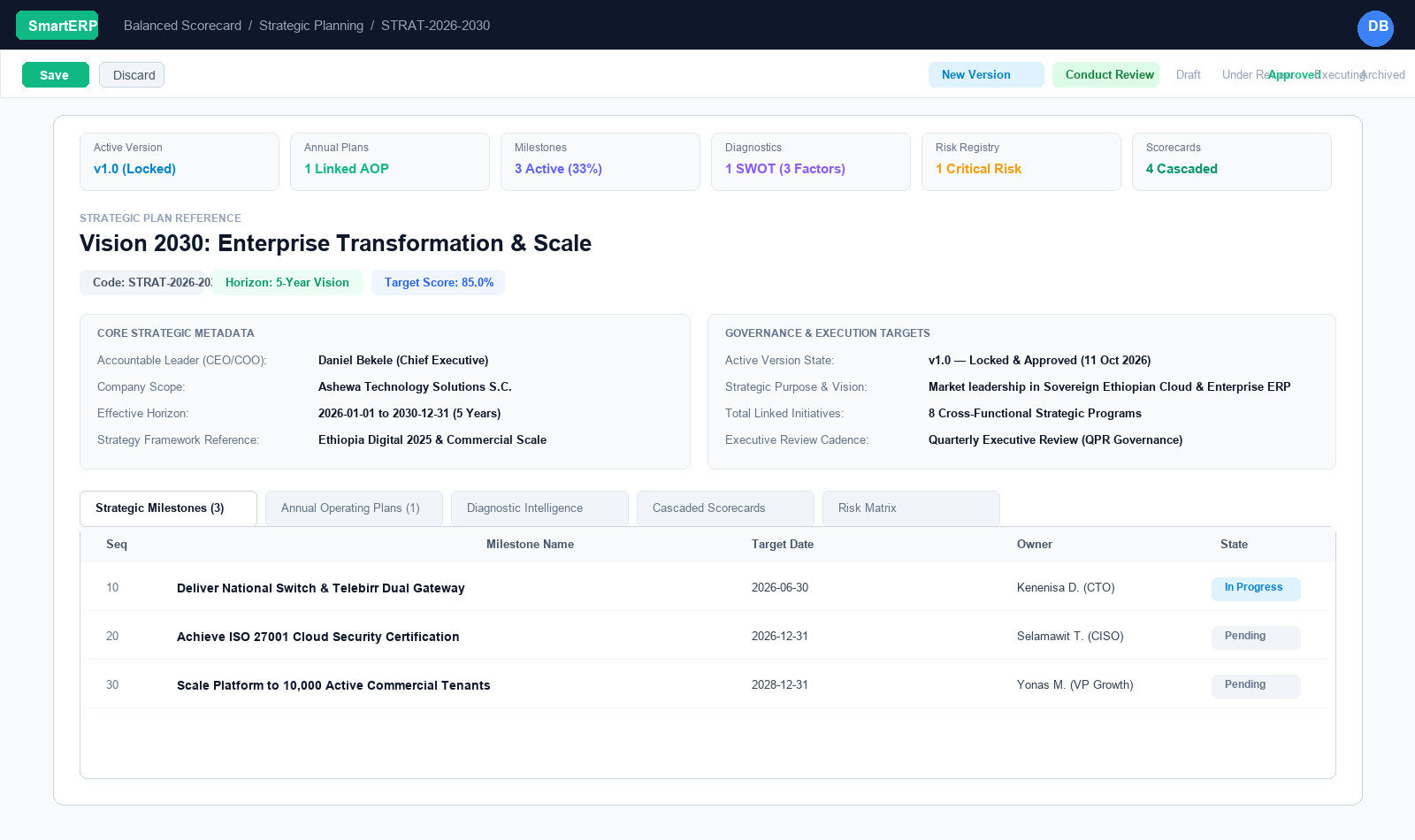
A strategic plan without temporal boundaries or milestone enforcement is merely wishful thinking. In SmartERP 19 BSC V3, the Strategic Plan (bsc.strategic.plan) is the root container that binds vision, capital, execution, and accountability into a single audited governance unit.
{screenshot:strategic-planning-and-milestones-overview-dashboard}
2. Prerequisites & Security Access Groups#
- Required Modules:
smarterp_balanced_scorecard, smarterp_strategy - Security Groups:
Strategy Officer(Technical ID:smarterp_balanced_scorecard.group_bsc_user)Strategy Director(Technical ID:smarterp_balanced_scorecard.group_bsc_manager)Executive Committee Member(Technical ID:smarterp_balanced_scorecard.group_bsc_executive)
- Master Data Dependencies: Strategic themes, 4 BSC perspectives (Financial, Customer, Internal Process, Learning & Growth), corporate KPIs, and quarterly appraisal periods.
3. Step-by-Step Configuration & Execution#
Step 1: Navigating to the Module Interface#
- Log into your SmartERP instance at
https://smarterp.et/odoo. - Open the main App Switcher (grid icon in the top-left corner).
- Select the Strategic Execution app icon.
- From the top navigation bar, open Strategic Execution → Perspectives → Strategic Objectives / KPIs / Action Plans.
{screenshot:strategic-planning-and-milestones-app-switcher-navigation}
Step 2: Creating and Parameterizing Records#
- Click the New button in the top-left control panel.
- Complete the mandatory fields in the record form:
- Objective / KPI Name (Mandatory): Precise strategic outcome statement
- Perspective (Mandatory): One of the 4 balanced perspectives with mandated weighting
- Weight (%) (Mandatory): Percentage allocation contributing to overall perspective score
- Target Value & Baseline (Mandatory): Quantifiable numerical goal and historical starting point
- Configure optional operational parameters and localized tags as required:
- Calculation Formula (Optional): Automated SQL query or module model metric extraction
- Initiative Champion (Optional): Department head or senior manager accountable for result
- Review Frequency (Optional): Monthly, quarterly, or annual appraisal cadence
- Click the Save icon in the control bar to commit the record.
{screenshot:strategic-planning-and-milestones-record-creation-form}
Step 3: Validating and Processing Transactions#
- State Transitions: Execute operational state progression (Draft → Active Target → Mid-Term Review → Final Appraisal → Locked).
- Ledger & System Impact: Financial perspective KPIs dynamically read General Ledger balances, revenue growth metrics, and cost ratios directly from the accounting engine.
- Audit Verification: Automated recording of author ID, timestamp, and immutable revision history.
{screenshot:strategic-planning-and-milestones-transaction-processing-state}
Strategic Planning Horizons#
When creating a new Strategic Plan, selecting a Horizon automatically calculates the default start and end dates based on standard corporate governance cycles:
| Horizon Selection | Duration | Default Time Span | Primary Use Case |
|---|---|---|---|
| 1-Year (Annual Plan) | 12 Months | Current calendar or fiscal year | Annual Operating Plans, emergency turnarounds, or single-year tactical directives. |
| 3-Year (Medium-Term) | 36 Months | 3 years forward | Product line expansions, market penetration, or technology replatforming. |
| 5-Year (Long-Term Growth) | 60 Months | 5 years forward (e.g., Vision 2030) | Corporate transformations, IPO readiness, infrastructure expansion, and national market leadership. |
| 10-Year (Decadal Vision) | 120 Months | 10 years forward | Sovereign infrastructure, institutional modernization, and long-term socio-economic mandates. |
| Custom Horizon | Variable | User-defined start & end dates | Special project-financed joint ventures, grant programs, or non-standard fiscal calendars. |
| Rolling Horizon | Dynamic | Continuously rolling forward | Agile organizations updating forecasts every quarter without fixed end boundaries. |
Creating a Strategic Plan Step-by-Step#
- Navigate to Balanced Scorecard $\rightarrow$ Strategic Planning $\rightarrow$ Strategic Plans.
- Click New.
- Enter the Plan Name (e.g., Vision 2030: Enterprise Transformation & Scale).
- Enter a unique Plan Code (e.g.,
STRAT-2026-2030). This code is enforced unique per company via a database-level uniqueness constraint. - Select the Horizon (e.g., 5-Year (Long-Term Growth)). The Date Start and Date End fields populate automatically.
- Designate the Accountable Leader (typically the CEO, COO, or Executive Sponsor).
- Under the Purpose & Strategy page, formulate:
- Strategic Purpose & Vision: The overarching organizational north star.
- Key Assumptions & Macro Drivers: Underlying economic, regulatory, and demographic premises.
- Intended Strategic Outcomes: The measurable qualitative and quantitative end-state.
- Click Save. The plan initializes in the
draftstate.
State Workflow & Governance#
Strategic plans follow a formal, audited state machine:
[ Draft ] ──> [ Under Review ] ──> [ Approved ] ──> [ Executing ] ──> [ Closed / Archived ]- Draft: The plan is being authored by strategic planners and analysts. Scorecards and milestones can be added, edited, or rearranged.
- Under Review: The plan has been submitted to the Executive Committee or Board of Directors for review and budget authorization.
- Approved: Formally sanctioned by executive leadership. In this state, an initial baseline version snapshot (
v1.0) is generated. - Executing: The plan is live. Cascaded scorecards are actively tracking operational KPI measurements, and milestones are monitored.
- Closed / Archived: The horizon has concluded, or the plan has been superseded by a new corporate vision. All historical data remains preserved for audit and comparative analysis.
Immutable Plan Versions & Audit Baseline#
In traditional spreadsheets, strategic targets are often quietly edited mid-year, obscuring original commitments. SmartERP BSC V3 enforces version immutability:
- Creating a Version Snapshot: Clicking the New Version action button opens a snapshot dialog. Planners assign a version label (e.g.,
v1.0,v2.0) and enter a changelog describing the strategic rationale. - Approval Lock: Once a version snapshot is marked Approved:
- The system captures a complete read-only image of the plan's targets, objectives, and milestones.
- ORM Protection: Python-level
write()andunlink()guards intercept any attempt to alter or delete approved snapshots, raising an explicitUserError.
- Superseded History: When strategy pivots occur, older versions remain preserved in the Version History notebook tab, recording who approved the revision and the exact timestamp.
Strategic Milestones & Dependency Validation#
Milestones (bsc.plan.milestone) represent critical non-negotiable operational checkpoints required to achieve the strategic vision.
Milestone Attributes#
- Milestone Name: Concise description of the deliverable (e.g., Achieve ISO 27001 Cloud Security Certification).
- Owner: The responsible executive or department lead.
- Target Date: Target completion deadline.
- State:
Pending,In Progress,Achieved,Delayed, orCancelled. - Predecessor Milestones: Direct dependencies that must be achieved before this milestone can begin.
- Linked Initiative & KPI: Optional bidirectional linkage to operational programs and quantitative metrics.
Circular Dependency Protection (DFS Algorithm)#
Strategic planning graphs frequently fail when recursive circular dependencies are introduced (e.g., Milestone A depends on Milestone B, which depends on Milestone C, which depends back on Milestone A).
SmartERP BSC V3 implements a native Depth-First Search (DFS) cycle-detection algorithm:
# System Validation on write() and create():
visited = set()
rec_stack = set()
# Traverses predecessor graph — raises ValidationError if a loop is detected.
If a user accidentally assigns a milestone as its own indirect predecessor, the system immediately displays a clear validation error:
"Circular dependency detected in Milestone hierarchy! A milestone cannot depend on itself or its own successors."
Milestone Progress Aggregation#
The parent Strategic Plan dynamically calculates the Milestone Progress % across all active deliverables:
$$\text{Milestone Progress \%} = \left( \frac{\text{Count of Achieved Milestones}}{\text{Total Active Milestones}} \right) \times 100$$
This progress bar is displayed directly on the Strategic Plan header and in the executive kanban card, providing immediate visual confirmation of execution velocity.
4. Advanced Configuration Points#
- Automated Actions & Scheduled Tasks (Crons):
BSC: Calculate quarterly KPI achievements(smarterp_bsc.ir_cron_compute_kpi): Runs quarterly on the 5th to compute composite achievement scoresBSC: Issue appraisal cascade reminders(smarterp_bsc.ir_cron_appraisal_alert): Runs monthly to remind objective champions to update progress
- Custom Print Templates & Reports:
- Institutional Balanced Scorecard Executive Dashboard
- Departmental Strategic Cascade Matrix
- KPI Performance Variance & Trend Analysis
- Corporate Strategy Execution Summary
- Multi-Company Rules: Record-level security isolation under Company 1 (
Ashewa Technology Solutions S.C.), preventing cross-company ledger leakage across parent and subsidiary legal entities.
5. Comprehensive Troubleshooting Matrix#
| Error Symptom / Exception | Probable Root Cause | Corrective Action / Resolution |
|---|---|---|
Weighting Error: Perspective weights do not equal 100% | Total weights assigned to objectives within perspective fail to sum to 100.00%. | Adjust individual objective weightings so the perspective total equals exactly 100%. |
Data Feed Error: Automated KPI metric returned null | Underlying model query failed or target database view has no records. | Verify connected model name and filter domain in the KPI automated calculation parameters. |
Lockout Error: Period results locked for executive review | Current appraisal quarter has been locked by the Strategy Director. | Obtain written authorization and request temporary unlock from the Strategy Director. |