Scorecard Templates & Alignment Index
Standard industry template catalog, KPI presets, organizational line-of-sight analysis, and alignment index calculation.
1. Overview & Business Value#
This comprehensive operational guide details the architecture, business workflows, configuration parameters, and execution steps for Scorecard Templates & Alignment Index within SmartERP.
Scorecard Templates & Alignment Index#
To prevent blank-page paralysis and accelerate enterprise adoption, SmartERP BSC V3 includes a Pre-Configured Template Catalog and an automated Organizational Alignment & Line-of-Sight Index.
{screenshot:templates-and-alignment-index-overview-dashboard}
2. Prerequisites & Security Access Groups#
- Required Modules:
smarterp_balanced_scorecard, smarterp_strategy - Security Groups:
Strategy Officer(Technical ID:smarterp_balanced_scorecard.group_bsc_user)Strategy Director(Technical ID:smarterp_balanced_scorecard.group_bsc_manager)Executive Committee Member(Technical ID:smarterp_balanced_scorecard.group_bsc_executive)
- Master Data Dependencies: Strategic themes, 4 BSC perspectives (Financial, Customer, Internal Process, Learning & Growth), corporate KPIs, and quarterly appraisal periods.
3. Step-by-Step Configuration & Execution#
Step 1: Navigating to the Module Interface#
- Log into your SmartERP instance at
https://smarterp.et/odoo. - Open the main App Switcher (grid icon in the top-left corner).
- Select the Strategic Execution app icon.
- From the top navigation bar, open Strategic Execution → Perspectives → Strategic Objectives / KPIs / Action Plans.
{screenshot:templates-and-alignment-index-app-switcher-navigation}
Step 2: Creating and Parameterizing Records#
- Click the New button in the top-left control panel.
- Complete the mandatory fields in the record form:
- Objective / KPI Name (Mandatory): Precise strategic outcome statement
- Perspective (Mandatory): One of the 4 balanced perspectives with mandated weighting
- Weight (%) (Mandatory): Percentage allocation contributing to overall perspective score
- Target Value & Baseline (Mandatory): Quantifiable numerical goal and historical starting point
- Configure optional operational parameters and localized tags as required:
- Calculation Formula (Optional): Automated SQL query or module model metric extraction
- Initiative Champion (Optional): Department head or senior manager accountable for result
- Review Frequency (Optional): Monthly, quarterly, or annual appraisal cadence
- Click the Save icon in the control bar to commit the record.
{screenshot:templates-and-alignment-index-record-creation-form}
Step 3: Validating and Processing Transactions#
- State Transitions: Execute operational state progression (Draft → Active Target → Mid-Term Review → Final Appraisal → Locked).
- Ledger & System Impact: Financial perspective KPIs dynamically read General Ledger balances, revenue growth metrics, and cost ratios directly from the accounting engine.
- Audit Verification: Automated recording of author ID, timestamp, and immutable revision history.
{screenshot:templates-and-alignment-index-transaction-processing-state}
1. Industry Template Catalog (bsc.scorecard.template)#
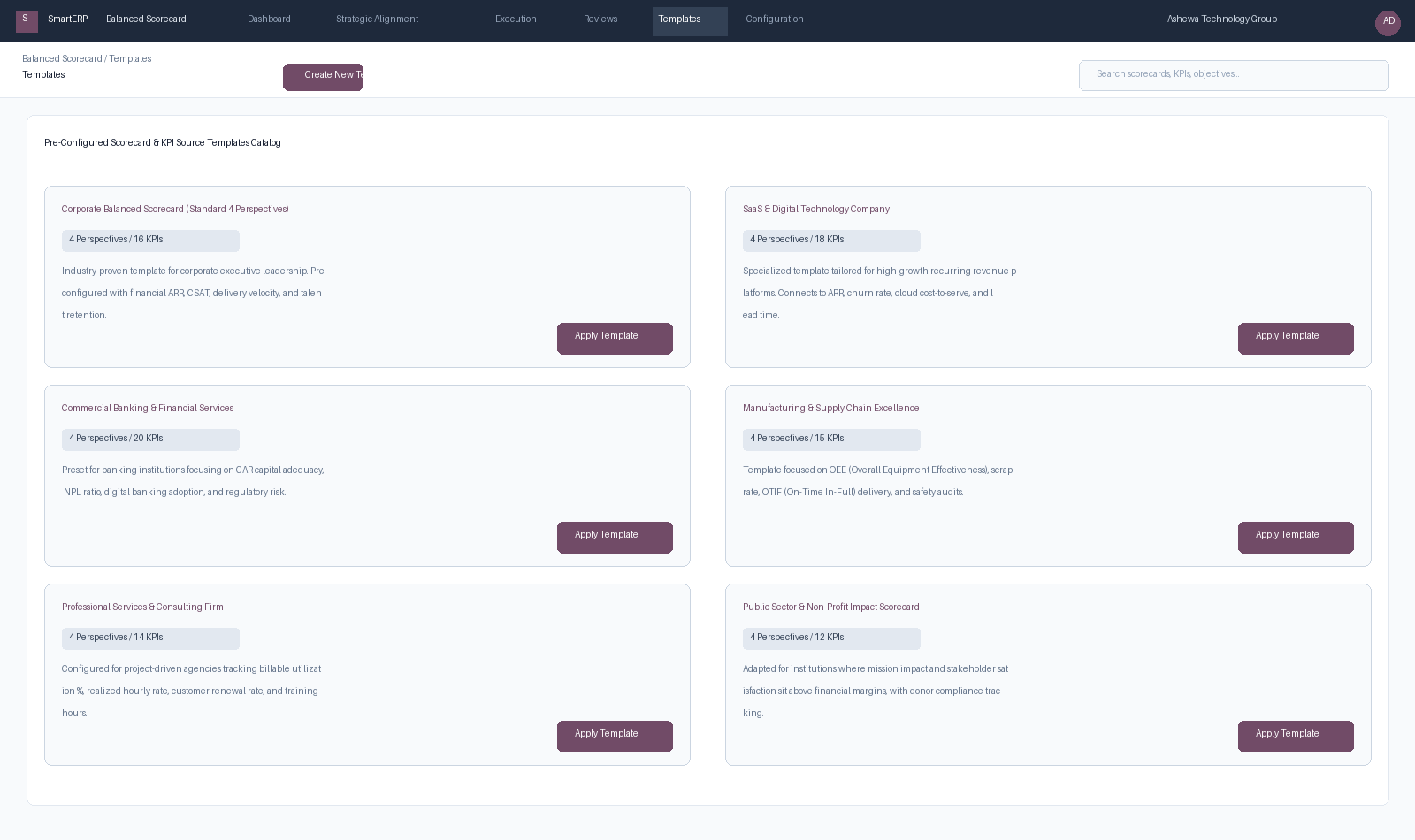
Figure 7.5: Scorecard and KPI Source Template catalog with 1-click deployment wizards for different industries.
Available Industry Presets#
- Standard Corporate (Norton-Kaplan): 4 standard perspectives, 16 balanced KPIs covering ARR, CSAT, operational cycle time, and staff development.
- SaaS & Recurring Subscription Platforms: Built for software companies; pre-connects to MRR/ARR, Net Retention Rate (NRR), customer churn %, CAC payback period, and cloud cost-to-serve.
- Banking & Financial Services: Tailored for financial institutions tracking Capital Adequacy Ratio (CAR), Non-Performing Loans (NPL), cost-to-income ratio, and digital channel transaction share.
- Manufacturing & Supply Chain: Centers on Overall Equipment Effectiveness (OEE), On-Time In-Full (OTIF) shipping rate, scrap rate, and OSHA safety compliance.
- Professional Services & Consulting: Focuses on billable utilization %, realized hourly billing rate, project margin %, and consultant certification milestones.
- Public Sector & Non-Profit: Reorders perspectives with Stakeholder & Citizen Impact at the pinnacle, supported by donor fund utilization and regulatory compliance.
1-Click Template Deployment#
- Navigate to Balanced Scorecard $\rightarrow$ Templates.
- Select the target industry template.
- Click Apply Template (
bsc.scorecard.template.apply). - Select the target Company, Fiscal Year, and Scorecard Name.
- Click Generate Scorecard. The system creates the scorecard, sets up the 4 perspectives with appropriate weights, instantiates all objectives, and generates the underlying KPI records with pre-configured calculation formulas.
2. Strategic Alignment & Line-of-Sight Index (bsc.alignment)#
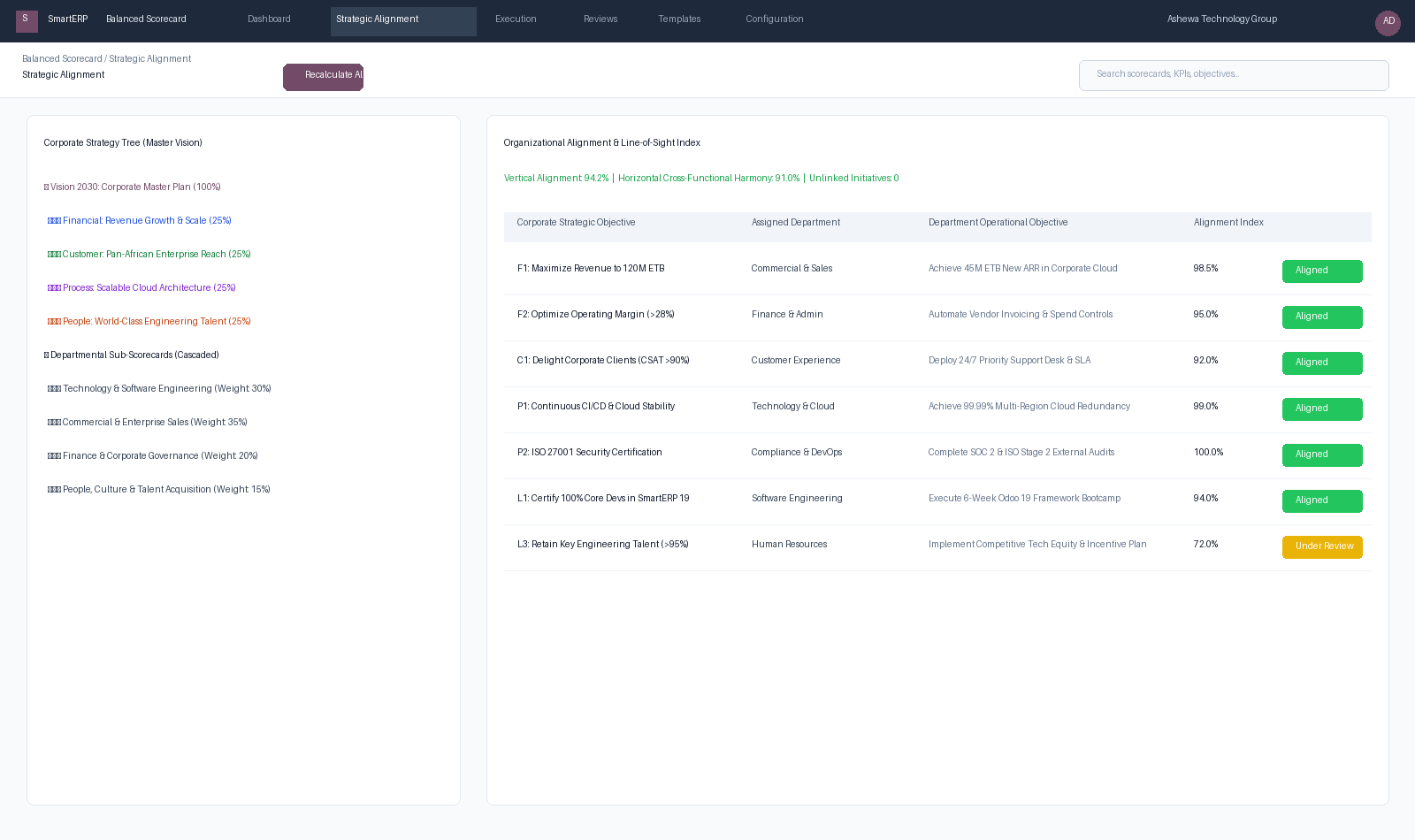
Figure 7.6: Alignment Workspace analyzing vertical and horizontal coherence across the corporate strategy tree.
What is the Alignment Index?#
The Organizational Alignment Index is a quantitative measurement (0% to 100%) that assesses how tightly operational initiatives and departmental scorecards are synchronized with the corporate master plan:
$$\text{Alignment Index} = \frac{\sum (\text{Linked Objectives Weight} \times \text{Harmony Score})}{\text{Total Corporate Objectives Weight}} \times 100$$
Key Metrics Tracked#
- Vertical Line of Sight: Verifies that every departmental and individual objective maps directly to at least one parent corporate objective.
- Horizontal Cross-Functional Harmony: Evaluates dependencies between departments (e.g., Sales requiring Engineering features; Marketing supporting Sales targets) to prevent organizational silos.
- Unlinked Initiatives Audit: Flags any active project or initiative that is consuming budget without directly driving a recognized strategic objective.
4. Advanced Configuration Points#
- Automated Actions & Scheduled Tasks (Crons):
BSC: Calculate quarterly KPI achievements(smarterp_bsc.ir_cron_compute_kpi): Runs quarterly on the 5th to compute composite achievement scoresBSC: Issue appraisal cascade reminders(smarterp_bsc.ir_cron_appraisal_alert): Runs monthly to remind objective champions to update progress
- Custom Print Templates & Reports:
- Institutional Balanced Scorecard Executive Dashboard
- Departmental Strategic Cascade Matrix
- KPI Performance Variance & Trend Analysis
- Corporate Strategy Execution Summary
- Multi-Company Rules: Record-level security isolation under Company 1 (
Ashewa Technology Solutions S.C.), preventing cross-company ledger leakage across parent and subsidiary legal entities.
5. Comprehensive Troubleshooting Matrix#
| Error Symptom / Exception | Probable Root Cause | Corrective Action / Resolution |
|---|---|---|
Weighting Error: Perspective weights do not equal 100% | Total weights assigned to objectives within perspective fail to sum to 100.00%. | Adjust individual objective weightings so the perspective total equals exactly 100%. |
Data Feed Error: Automated KPI metric returned null | Underlying model query failed or target database view has no records. | Verify connected model name and filter domain in the KPI automated calculation parameters. |
Lockout Error: Period results locked for executive review | Current appraisal quarter has been locked by the Strategy Director. | Obtain written authorization and request temporary unlock from the Strategy Director. |